How to Automate Your Small Business: A Beginner’s Step-by-Step Guide
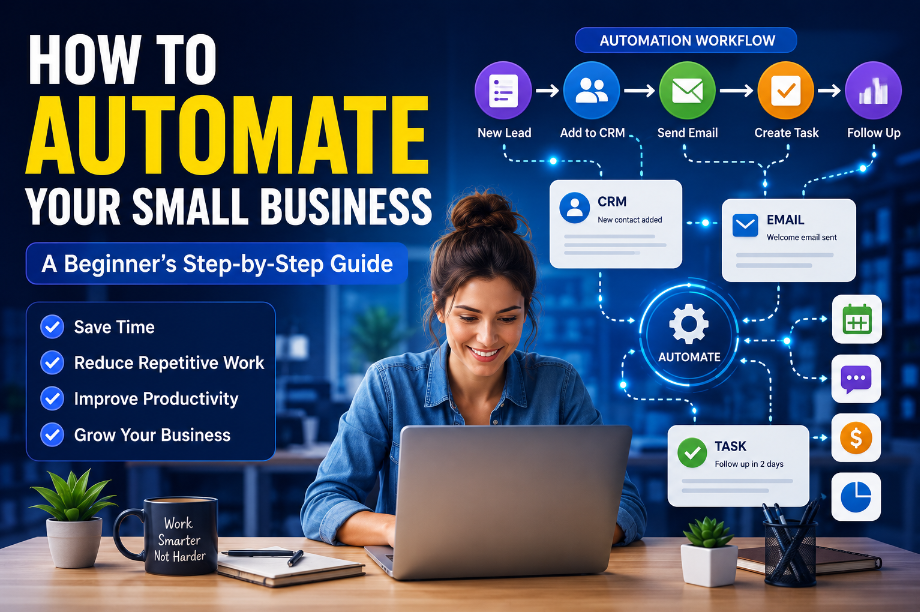
How to Automate Your Small Business: A Beginner’s Step-by-Step Guide
Meta Title: How to Automate Your Small Business: A Beginner’s Step-by-Step Guide
Meta Description: Learn how to automate your small business step by step, save time, reduce repeated work, and build simple workflows without coding.
Focus Keyword: Small Business Automation
Introduction: You Don’t Need a Big Team to Use Automation
Running a small business can feel like doing ten jobs at the same time.
You answer emails, follow up with customers, update spreadsheets, schedule meetings, send invoices, manage social media, and keep track of new leads. The problem is that many of these tasks are repeated every day.
This is where Small Business Automation can make a real difference.
Automation lets software handle simple, repeated steps for you. For example, when someone fills out your contact form, an automated workflow can save their information, send a confirmation email, and create a follow-up task.
You still control the important decisions. The software simply takes care of the routine work.
And you do not need to automate your whole business at once. Starting with one small task is often the smarter approach.
What Is Small Business Automation?
Small business automation means using software to complete repeated business tasks with little or no manual work.
A simple automation usually has three parts:
Trigger → Action → Result
For example:
New customer fills out a form → send a welcome email → create a customer record.
Another example:
New sales lead arrives → add lead to CRM → notify salesperson → create follow-up task.
Modern workflow tools can use triggers and actions to handle tasks such as sending emails, creating follow-ups, updating customer data, and assigning work.
The key idea is simple:
If you do the same task again and again, ask whether software can safely do part of it for you.
Why Should a Small Business Use Automation?
Automation is not just about saving a few minutes.
When small tasks happen many times a week, the saved time can become significant.
1. Save Time
Imagine you spend five minutes adding every new lead to your spreadsheet and sending a basic reply.
If 30 leads arrive in a week, that is 150 minutes.
An automated workflow could handle much of that routine work.
2. Reduce Simple Mistakes
People forget things.
A follow-up email may be missed. A task may not be assigned. A customer record may not get updated.
A well-tested workflow can make these simple steps more consistent.
3. Reply to Customers Faster
Customers do not always contact you during business hours.
An automatic confirmation can tell them that their message was received while your team handles the next step.
4. Give Your Team More Time
Your employees should not spend most of their day copying information between tools.
Let software handle simple repeated work so people can focus on customers, sales, ideas, and problems that need human judgment.
5. Make Growth Easier
A business may start with 10 customers and later have 100.
If every new customer creates ten manual tasks, your workload grows very quickly.
Automation can help your process handle more activity without adding the same amount of manual work.
What Tasks Should You Automate First?
Not every business task should be automated.
The best starting point is usually a task that is:
- Repeated often
- Easy to explain
- Based on clear rules
- Low risk
- Time-consuming
- Unlikely to need human judgment
Here are some good examples:
Business Task
Can It Be Automated?
Beginner Level
Email confirmation
Yes
Easy
Lead entry
Yes
Easy
Appointment reminders
Yes
Easy
Task assignment
Yes
Easy
Customer follow-up
Yes
Medium
Invoice reminders
Yes
Medium
Social media scheduling
Yes
Easy
Customer support replies
Partly
Medium
Hiring decisions
Not fully
High human input
Important customer complaints
Not fully
Human review
The rule is simple:
Automate the process, not the judgment.
Step 1: Find Your Most Repetitive Task
Before buying automation software, look at your normal workday.
Write down tasks that you repeat.
For example:
Every morning:
- Check new emails
- Check new leads
- Update the CRM
- Send follow-ups
- Assign tasks
Now ask:
“Which one of these tasks happens again and again?”
That task may be your first automation opportunity.
Beginner Tip
Do not choose the biggest problem first.
Choose the easiest useful problem.
A small automation that works well is better than a large automation that creates more problems.
Step 2: Write Down the Current Process
This step is easy to skip, but it can save you trouble later.
Before creating automation, write down exactly what happens now.
For example:
New lead arrives → employee checks email → copies information → opens CRM → creates contact → sends reply → creates follow-up task.
Now look at each step.
Ask:
Does a person really need to do this?
Maybe the employee only needs to review the lead.
The software could handle the other steps.
That gives you a much cleaner process:
New lead → CRM record → confirmation email → follow-up task → human review
Step 3: Choose the Right Automation Tool
You do not need ten different tools.
One good tool can often handle your first few workflows.
For connecting different apps
Zapier is a useful option when you want different apps to work together.
For example:
Website form → Google Sheets → Gmail → task manager
For more detailed workflows
Make can be useful when your workflow has several steps, conditions, or different paths.
For customer and sales workflows
HubSpot can be useful when you want automation connected to CRM data.
HubSpot’s current workflow guide recommends starting with a few repeatable processes and then adding more automation as you learn what works.
For team tasks
Tools such as Asana, monday.com, and ClickUp can help automate task updates, assignments, reminders, and project steps.
The right tool depends on your workflow.
Do not choose software simply because it has more features.
Step 4: Build Your First Simple Workflow
Let’s create a real example.
Imagine you run a small web design business.
A new customer fills out your website contact form.
Your old process may look like this:
Form submission → check email → copy customer details → create CRM record → send email → create task
Your automated process could become:
Form submission → create contact → send confirmation → create task
Now the business owner only needs to handle the part that requires a human.
This is the real value of automation.
You are not removing the customer relationship.
You are removing the repeated admin work around it.
Step 5: Add a Human Check
This is one of the most important steps.
Do not make every automation completely automatic.
Some actions should stop and wait for a person.
For example:
New customer → automatic confirmation → create task → human reviews request → next action
This is safer than allowing software to make every decision.
Human review is especially useful when the workflow involves:
- Large payments
- Refunds
- Complaints
- Sensitive customer issues
- Important contracts
- Hiring
- Unusual requests
Automation should make work easier, not make bad decisions faster.
Step 6: Test Everything Before You Turn It On
Never assume your first workflow will work perfectly.
Test it with sample information.
Check:
- Did the trigger work?
- Was the right customer added?
- Was the email sent?
- Was the correct person notified?
- Was the task created?
- What happens if information is missing?
- What happens if the workflow fails?
A small test can prevent a large mistake.
Example
Suppose your automation sends a welcome email to every new contact.
Before turning it on for 1,000 customers, test it with your own email address.
Make sure the message looks right.
Step 7: Measure the Result
After one or two weeks, check whether the automation is actually helping.
Ask four simple questions:
How much time did we save?
Did the number of mistakes decrease?
Are customers getting faster replies?
Is the team happier with the process?
If the answer is yes, keep the workflow.
If the workflow creates more work than it saves, change it.
Automation is not successful just because it runs.
It is successful when it makes the business better.
7 Small Business Tasks You Can Automate
If you are not sure where to begin, try one of these.
1. New Lead Follow-Up
New lead → add to CRM → send confirmation → create follow-up task
This is one of the easiest places to start.
2. Appointment Reminders
Appointment booked → confirmation → reminder → follow-up
This can reduce the number of messages your team needs to send manually.
3. Customer Onboarding
New customer → welcome email → instructions → task creation → follow-up
It also helps make sure every new customer gets the same basic steps.
4. Invoice Reminders
Invoice due → check payment status → send reminder
For financial tasks, always make sure the workflow matches your accounting process and includes human review where needed.
5. Content Workflow
Article finished → editor notified → review task → publishing task
This is useful for blogs, agencies, and content teams.
6. Internal Requests
Employee submits request → manager notified → approval → task assigned
This can work well for simple office processes.
7. Customer Feedback
Customer completes survey → save response → notify team if rating is low
The important part here is the human follow-up.
Automation can find the problem.
A person should often solve it.
Common Small Business Automation Mistakes
Automation can save time, but poor automation can create new problems.
Mistake 1: Automating Everything
You do not need to automate every task.
Start with one process and learn from it.
Mistake 2: Using Too Many Tools
Adding five new software platforms can make your business harder to manage.
Use the fewest tools that can solve the problem.
Mistake 3: Building Complicated Workflows Too Early
A simple workflow is easier to test and fix.
Start small.
Mistake 4: Forgetting Human Review
Some tasks need human judgment.
Keep people involved where the cost of a mistake is high.
Mistake 5: Never Checking the Automation
A workflow that worked six months ago may stop working after a software change.
Review important automations from time to time.
A Simple Small Business Automation Plan
If you are completely new to automation, use this plan:
Week
Goal
Week 1
Find one repetitive task
Week 2
Map the current process
Week 3
Build and test one automation
Week 4
Measure the result and improve it
After that, choose your second task.
This approach is much easier than trying to automate the entire company in one weekend.
The Best Automation Is Often the Smallest One
There is a common idea that successful automation means building a huge system with dozens of connected apps.
That is not always true.
Sometimes the most useful automation is something very simple.
For example:
New customer → send confirmation email
That one small workflow may save hundreds of manual emails over a year.
Another business may benefit more from:
New lead → create follow-up task
The value depends on the business.
So instead of asking:
“What can I automate?”
Ask:
“What repeated task is slowing my business down?”
That question usually leads to a better answer.
Final Thoughts
Small Business Automation does not have to be difficult, expensive, or technical.
You can start with one repeated task, write down the steps, remove the parts that software can safely handle, and keep people involved where judgment matters.
Start with something simple like lead follow-ups, appointment reminders, customer onboarding, or task assignment.
Then test it.
Measure the time saved.
Fix anything that does not work.
And only then move to the next process.
The goal is not to make your business feel like a robot.
The goal is to give you and your team more time to do the work that actually needs you.
Ready to Automate Your First Task?
Look at your workday today and find one task you have repeated at least three times.
Write down the steps.
Then ask:
“Could software safely handle this part for me?”
That could be the first step toward a simpler business.
If you want to explore the tools that can help, read our guide to Business Automation Software: 10 Best Tools to Save Time and Grow Your Business and compare the options before choosing one.
Related Articles
- Zapier vs Make: Which Automation Tool Is Better for Your Business?
- Best Workflow Automation Tools for Small Businesses in 2026
- 10 Business Tasks You Should Automate Right Now
- Best AI Tools for Small Businesses: 15 Tools That Save Time and Money
- How to Automate Customer Follow-Ups Without Losing the Human Touch