5 Best Free AI Tools for Students in 2026: Study Faster, Write Better, and Save Time
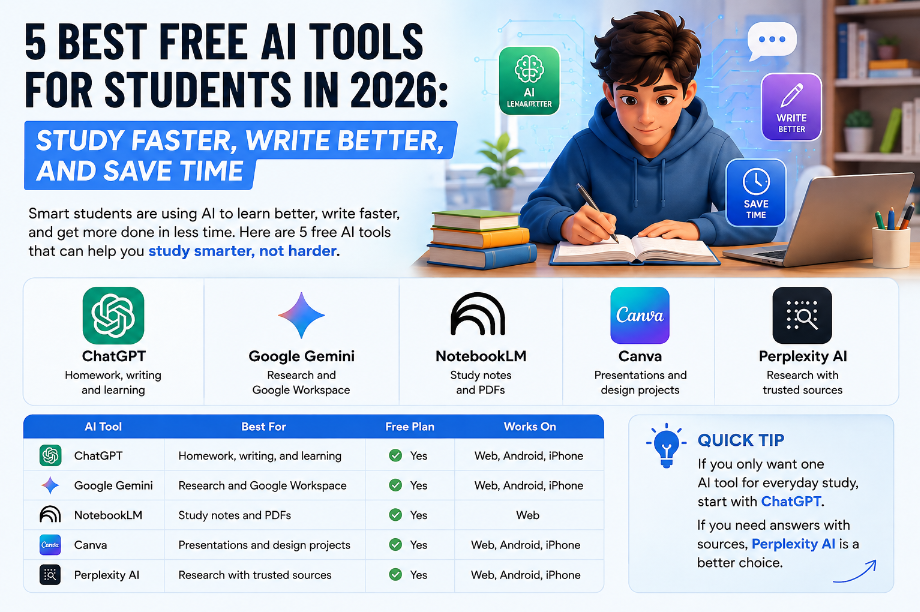
5 Best Free AI Tools for Students in 2026: Study Faster, Write Better, and Save Time
Focus Keyword: Free AI Tools for Students
Meta Title: 5 Best Free AI Tools for Students in 2026: Study Faster, Write Better, and Save Time
Meta Description: Looking for the best Free AI Tools for Students? Discover 5 powerful AI tools that help you study faster, write better, take smart notes, and save time in 2026.
SEO URL: yourdomain.com/free-ai-tools-for-students

Every student wants to study faster, finish homework on time, and get better results. But with classes, assignments, projects, and exams, staying on top of everything is not always easy.
That is why many students are now using Free AI Tools for Students to make learning easier. These tools can explain difficult topics, help write essays, summarize long notes, create presentations, and even answer questions in seconds. When used the right way, they can save hours every week and make studying less stressful.
However, not every AI tool is worth your time. Some are better for writing, while others work best for research, note-taking, or presentations. Choosing the wrong tool can waste your time instead of saving it.
To help you make the right choice, I looked at the most popular free AI tools based on their features, ease of use, free plan, and how useful they are for everyday student tasks. This guide highlights the five tools that stand out in 2026 and explains when each one works best.
Let’s get started.
Quick Comparison Table
AI Tool
Best For
Free Plan
Works On
ChatGPT
Homework, writing, and learning
✅ Yes
Web, Android, iPhone
Google Gemini
Research and Google Workspace
✅ Yes
Web, Android, iPhone
NotebookLM
Study notes and PDFs
✅ Yes
Web
Canva
Presentations and design projects
✅ Yes
Web, Android, iPhone
Perplexity AI
Research with trusted sources
✅ Yes
Web, Android, iPhone
Quick Tip: If you only want one AI tool for everyday study, start with ChatGPT. If you need answers with sources, Perplexity AI is a better choice.
How We Chose These AI Tools
There are hundreds of AI tools available today, but not all of them are useful for students. To create this list, each tool was reviewed using the same criteria.
We looked at:
- Free plan and daily limits
- Ease of use for beginners
- Writing and study features
- Research and fact-checking support
- Note-taking and document handling
- Device compatibility
- Overall value for students
This approach helps you compare each tool fairly and choose the one that matches your study style.

Why Students Are Using AI in 2026
Think about the last time you spent an hour looking for one answer online. You opened five websites, watched two videos, and still felt confused.
Now imagine getting a simple explanation, clear notes, and a study plan in less than five minutes. That is why more students are turning to AI in 2026.
The best Free AI Tools for Students can explain hard topics, summarize long chapters, improve writing, and even help create presentations. Instead of replacing learning, these tools help you spend more time understanding your lessons and less time searching for answers.
Of course, AI is not perfect. It can make mistakes, so you should always check important facts before using them in homework or assignments.
What Makes a Great AI Tool for Students?
To create this list, we looked for tools that offer:
- A useful free plan
- Simple and beginner-friendly design
- Strong writing and research support
- Helpful note-taking features
- Good value for everyday study
Every tool in this guide was selected because it can help students save time, learn better, and stay more organized.
Quick Tip: The smartest students don’t use AI to do their work. They use AI to learn faster and understand more.

ChatGPT
Best for Homework, Writing, and Everyday Learning
If you ask most students which AI tool they have tried, ChatGPT is usually the first answer. Since its launch by OpenAI, it has become one of the most popular study tools in the world.
ChatGPT helps students understand difficult topics, improve writing, solve simple math problems, and brainstorm ideas for assignments. Instead of giving long and confusing answers, it can explain many subjects in a way that is easier to understand.
One reason students love ChatGPT is its flexibility. Whether you are writing an essay, preparing for an exam, or learning a new topic, it can support you in different ways.
Key Features
- Explains difficult topics in simple words
- Summarizes long notes and articles
- Helps write essays, emails, and assignments
- Solves basic coding and math questions
- Creates quizzes, flashcards, and study plans
Free Plan
The free version gives students access to powerful AI features for everyday learning. While some advanced tools and higher limits are available with paid plans, the free plan is more than enough for homework, writing, and daily study.
Real-Life Example
Imagine you have a biology exam tomorrow, but a chapter still feels confusing. Instead of reading the same page again and again, you can ask ChatGPT to explain the topic like a teacher or even like you’re 12 years old. It can also create a short quiz to test what you learned.
Things to Know
- Always check facts before submitting assignments.
- Use ChatGPT to understand ideas, not to copy answers.
- Some advanced features are only available with a paid subscription.
Final Verdict
⭐⭐⭐⭐⭐ 4.9/5
ChatGPT is the best all-around AI tool for students. It is easy to use, works well across many subjects, and offers enough free features to help with everyday learning. If you are just starting with AI, this is the first tool you should try.

Google Gemini
Best for Research, Google Workspace, and Daily Study
When you need fresh information or work with Google Docs, Gmail, or Drive, Google Gemini is one of the best AI tools to use. Built by Google, it is designed to help students research topics, organize ideas, and complete school work faster.
One thing that makes Gemini different is its connection with Google’s ecosystem. If you already use Google services for your studies, Gemini can fit naturally into your daily workflow. It can summarize information, explain complex topics, and even help you create outlines for essays or presentations.
Key Features
- Explains difficult topics in simple language
- Helps with research and fact-based questions
- Works with Google Docs, Gmail, and Drive
- Creates outlines, summaries, and study notes
- Supports text, images, and file uploads
Free Plan
The free version offers powerful AI features for most daily study tasks. Students can ask questions, upload files, brainstorm ideas, and get help with writing without paying for a subscription.
Real-Life Example
Imagine your teacher asks you to prepare a presentation on climate change. Instead of reading dozens of websites, you can use Gemini to understand the topic, organize key points, and create a clear presentation outline in minutes.
Things to Know
- Check important facts before submitting assignments.
- Some advanced AI features are available only in paid plans.
- The quality of answers depends on how clearly you ask your question.
Final Verdict
⭐⭐⭐⭐⭐ 4.8/5
Google Gemini is a great choice for students who use Google Workspace every day. It is fast, beginner-friendly, and especially useful for research, writing, and organizing study materials.

NotebookLM
Best for Studying from PDFs, Notes, and Class Materials
Reading long PDFs before an exam can take hours. NotebookLM makes this much easier by turning your own study materials into a personal AI study assistant.
Built by Google, NotebookLM works differently from most AI chatbots. Instead of searching the internet, it focuses on the documents you upload. This means the answers are based on your class notes, PDFs, research papers, or lecture slides.
If you want to study smarter without jumping between different websites, NotebookLM is one of the best free AI tools available today.
Key Features
- Upload PDFs, notes, and Google Docs
- Get answers based on your own study materials
- Create summaries in seconds
- Generate study guides and practice questions
- Turn long notes into easy-to-read key points
Free Plan
The free plan gives students enough features for everyday learning. You can upload study materials, ask questions, and create summaries without paying for a subscription.
Real-Life Example
Imagine you have a 60-page history PDF to read before tomorrow’s exam. Instead of reading every page again, upload it to NotebookLM and ask for chapter summaries, important dates, or practice questions. It helps you review faster and stay focused on what matters most.
Things to Know
- It works best with your own documents.
- Upload clear and well-organized study materials for better answers.
- It is designed for learning, not for finding live information from the web.
Final Verdict
⭐⭐⭐⭐⭐ 4.9/5
NotebookLM is one of the best AI tools for exam preparation. If you study from PDFs, lecture notes, or class handouts, this tool can save time and help you remember important information more easily.

Canva
Best for Presentations, Posters, and School Projects
A good presentation can make your project stand out. Canva helps students create professional-looking slides, posters, infographics, and social media designs without any design experience.
With thousands of free templates and AI-powered design tools, Canva makes it easy to turn ideas into eye-catching visuals. Whether you’re working on a science project, classroom presentation, or group assignment, Canva can help you finish faster.
Key Features
- Ready-made presentation templates
- AI-powered design suggestions
- Create posters, infographics, and flyers
- Easy drag-and-drop editor
- Works on desktop and mobile devices
Free Plan
The free plan includes thousands of templates, design elements, photos, icons, and basic AI features. It offers everything most students need for school projects and presentations.
Real-Life Example
Imagine your teacher asks you to create a presentation about renewable energy. Instead of starting from a blank slide, choose a Canva template, add your content, and create a professional presentation in less than 30 minutes.
Things to Know
- Some premium templates and AI features require Canva Pro.
- A clean design is often more effective than adding too many effects.
- Save your work regularly when collaborating with classmates.
Final Verdict
⭐⭐⭐⭐⭐ 4.8/5
Canva is one of the easiest design tools for students. If you want better presentations, posters, or classroom projects without spending hours on design, Canva is a fantastic free choice.

Perplexity AI
Best for Research with Trusted Sources
Finding reliable information online can take a lot of time. You may open several websites before finding the answer you need. Perplexity AI makes this process much faster.
Unlike many AI chatbots, Perplexity AI includes links to the sources it uses. This makes it easier to verify information and explore trusted websites for deeper research. For students working on essays, reports, or research projects, this feature is a big advantage.
If your teacher asks you to include references in your assignment, Perplexity AI can help you find useful information and point you toward the original sources.
Key Features
- Answers with source links
- Summarizes articles and web pages
- Supports follow-up questions
- Fast web-based research
- Simple and beginner-friendly interface
Free Plan
The free plan is suitable for everyday research and learning. Students can ask questions, explore reliable sources, and understand new topics without paying for a subscription.
Real-Life Example
Suppose you are writing a report about renewable energy. Instead of searching through many websites, ask Perplexity AI your question. It will provide a clear answer along with links to trusted sources, helping you save time and verify the information.
Things to Know
- Always read the original source before using it in your assignment.
- Some advanced AI models are available only with the paid plan.
- Compare information from more than one source for important projects.
Final Verdict
⭐⭐⭐⭐⭐ 4.8/5
Perplexity AI is one of the best free research tools for students. If you want quick answers backed by trusted sources, it is an excellent choice for essays, reports, and school projects

.Which AI Tool Should You Choose?
After testing these tools, one thing became clear—there is no single AI tool that is perfect for every student. The best choice depends on what you need help with.
If you mostly write essays and complete homework, ChatGPT is a great place to start. If research is your main focus, Perplexity AI gives answers with trusted sources. Students who study from PDFs and lecture notes will get the most value from NotebookLM. For presentations and creative school projects, Canva is hard to beat. And if you already use Google Docs, Gmail, and Drive every day, Google Gemini fits naturally into your workflow.
Quick Decision Guide
If You Need…
Best AI Tool
Homework and writing
ChatGPT
Research with sources
Perplexity AI
Study from PDFs
NotebookLM
Presentations and posters
Canva
Google Workspace
Google Gemini
My Recommendation: If you are new to AI, start with ChatGPT and Canva. As your study needs grow, add NotebookLM for exam preparation and Perplexity AI for research.
Final Thoughts
AI is changing the way students learn, but the best results still come from your own effort. Think of these tools as study partners that help you save time, understand difficult topics, and stay organized.
The good news is that every tool in this guide offers a free plan, so you can try them yourself before deciding which one works best for your study style.
Frequently Asked Questions
1. Which is the best free AI tool for students?
ChatGPT is the best all-around choice for homework, writing, and everyday learning. However, the best tool depends on your needs.
2. Is ChatGPT free for students?
Yes. ChatGPT offers a free plan with enough features for most daily study tasks.
3. Which AI tool is best for studying from PDFs?
NotebookLM is the best choice because it can answer questions based on the documents you upload.
4. Which AI tool gives answers with sources?
Perplexity AI provides answers with links to trusted sources, making it a great option for research.
5. Is Canva free for students?
Yes. Canva offers a free plan with thousands of templates for presentations, posters, and school projects.
Conclusion
The best Free AI Tools for Students are not the ones with the most features—they are the ones that make learning easier. Whether you need help with homework, research, note-taking, or presentations, these five tools can save time and improve your study routine.
Start with one tool, learn how to use it well, and then explore the others as your needs grow. Small changes in the way you study today can make a big difference in your results tomorrow.
Call to Action
Which AI tool do you use the most? Share your favorite in the comments below. If this guide helped you, don’t forget to share it with your classmates. You can also explore our other AI tool guides to discover more free tools that make studying easier.